
Sommaire
1. Imposez-vous des horaires réguliers
2. Prenez le temps de vous préparer le matin
3. Définissez votre espace de travail et résistez à la tentation du canapé
4. Organisez-vous comme au bureau
5. Cherchez la lumière
6. Maintenez une bonne communication
7. Organisez un planning pour les enfants
8. Faites des pauses
9. Restez actifs
10. Pensez à votre posture !
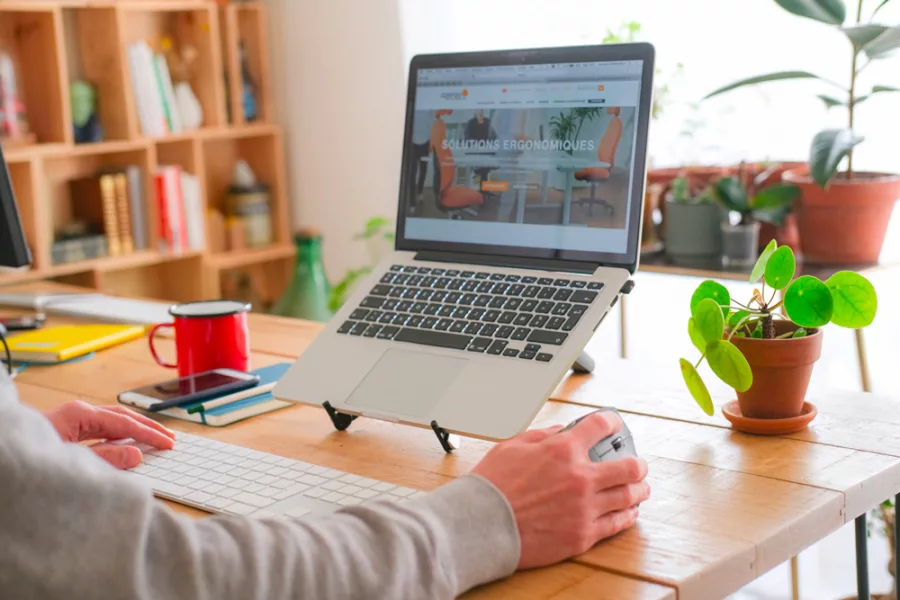
Fin 2019, seulement 1,8 millions de personnes (1) pratiquaient le télétravail en France. Ce chiffre peut paraître relativement bas compte tenu du nombre total de salariés sur le territoire national. Cependant, le home office est devenu ces dernières années une pratique de plus en plus courante en entreprise.
Avec le confinement décrété en mars 2020 en raison du COVID-19, il a connu un véritable boom, contraignant la majorité des entreprises et des salariés dont l’activité le permet, à s’adapter rapidement, au détriment parfois, du confort et de la posture des personnes. Comment s’organiser au mieux dans ces conditions pour être productif ? Comment éviter les douleurs liées à une mauvaise posture ? Existe-t-il des solutions ergonomiques pour améliorer notre aménagement à la maison ? Voici quelques conseils qui permettront de vous donner les pistes d’amélioration pour vivre au mieux cette période insolite dans le monde du travail.
Le télétravail peut représenter un vrai challenge pour certains : changement de rythme, nouvelles habitudes à prendre, difficultés à s’organiser et à se concentrer, en particulier lorsque le contexte familial vient s’en mêler, notamment avec nos chers bambins. Cependant, cette nouvelle routine peut être positive professionnellement parlant en appliquant quelques bonnes pratiques afin d’avoir une routine saine, tant pour la sphère personnelle que professionnelle.
Même s’il présente de nombreux avantages, comme la hausse de la productivité, le télétravail est un mode de travail particulier qu’il faut savoir «dompter». Certaines personnes se disent plus efficaces notamment grâce au temps gagné par l’absence du trajet domicile-travail. D’autres rencontrent des difficultés à travailler en raison des nombreuses distractions présentes dans la maison. Il est cependant très facile de s’organiser et d’améliorer ses conditions de travail en suivant les conseils suivants :
1. Imposez-vous des horaires réguliers
De la même façon que vous l’auriez fait au bureau, il est important de définir des heures de travail régulières à la maison. En effet, l’équilibre entre la vie professionnelle et la vie personnelle n’est pas facile à trouver. En télétravail, on évite le temps perdu dans les transports, mais sans cadre, on perd cette coupure qu’il y a entre le domicile et le travail, ainsi que toutes les habitudes nécessaires à l’esprit pour savoir à quel moment il passe d’un cadre à l’autre. Se fixer des horaires à respecter permet également de condenser son temps de travail et donc d’optimiser sa productivité, tout en ne pénalisant pas sa vie de famille.
2. Prenez le temps de vous préparer le matin
L’erreur la plus tentante est de mettre le réveil un peu plus tard, et d’attraper son ordinateur au saut du lit. Cette mauvaise habitude est une source de stress qui ne vous met pas dans de bonnes conditions pour le reste de la journée.
Levez-vous un peu plus tôt, et prenez le temps de vous préparer, de vous habiller convenablement, de petit-déjeuner et prendre votre café comme vous l’auriez fait avant de vous rendre au travail. Ces habitudes permettent de se préparer inconsciemment à passer d’une sphère à l’autre, et ainsi éviter les émotions négatives qui peuvent altérer la qualité de votre travail et votre productivité. Cela permettra de donner inconsciemment une meilleure impression à vos collaborateurs en cas d’appel visio.
3. Définissez votre espace de travail et résistez à la tentation du canapé

Choisissez un endroit propice au travail, idéalement un endroit fixe comme une pièce dédiée ou un bureau où il est facile de s’isoler en fermant la porte. Cela limitera le bruit et les distractions extérieures. Le calme sera appréciable pour vous et vos interlocuteurs si vous devez téléphoner ou faire des réunions en visio.
À défaut, installez-vous à un endroit s’apparentant à un poste de travail, par exemple à une table, et asseyez-vous sur un fauteuil ou une chaise.
Pensez à effectuer quelques vérifications ergonomiques afin d’avoir une bonne posture : votre dos doit toucher le dossier, vos pieds doivent être à plat sur le sol. Si vos pieds ne touchent pas le sol, placez un repose-pieds, ou à défaut une pile de livres vous permettant de les surélever pour que vos genoux forment un angle de 90°.
En l’absence d’accoudoir, posez les avant-bras sur votre bureau ou plan de travail pour avoir les épaules relâchées. Si celles-ci sont trop hautes, vous risquez alors de ressentir des douleurs en fin de journée. Positionnez donc un coussin sous vos fesses, et relevez vos pieds comme expliqué précédemment s’ils se sont décollés du sol.
4. Organisez-vous comme au bureau
Avec un espace fixe, il est plus facile d’aménager votre équipement et vos affaires à proximité comme votre matériel informatique (ordinateur portable, tablette, souris, clavier, etc), ou encore vos documents. Le soir, pensez à mettre de l’ordre sur votre bureau comme vous le feriez au travail. Cela vous permettra de commencer le lendemain dans de bonnes conditions : un bureau ordonné permet d’avoir l’esprit plus libre et facilite la concentration.
5. Cherchez la lumière
Veillez également à ce que votre espace de travail dispose d’une bonne luminosité, notamment avec une fenêtre à côté. La lumière naturelle a un effet positif sur le moral, et aide à réduire la fatigue visuelle, à condition qu’elle soit maitrisée. Placez-vous de préférence de façon perpendiculaire à votre fenêtre pour éviter les reflets sur l’écran et éviter d’être trop ébloui. Une fenêtre à proximité vous permettra également d’obtenir régulièrement de l’air frais et de pouvoir regarder au loin pendant vos pauses, ce qui fera du bien à l’esprit et aux yeux !
Si vous êtes amenés à travailler dans une pièce sombre, ou pendant des horaires où la lumière est moins présente, veillez à avoir une source de lumière à proximité qui éclaire votre espace de travail sans être trop intense pour que vos yeux ne fatiguent pas.
6. Maintenez une bonne communication
Côté travail, sans tomber dans la “réunionite” ou l’hyper-contrôle, prenez des nouvelles de vos équipes et collègues. Cela vous permettra de garder un lien avec votre entreprise. Prévoyez régulièrement des points dans la semaine, par mail ou téléphone ou visio-conférence pour maintenir votre organisation et continuer à faire avancer vos différents projets. Restez toutefois indulgents et compréhensifs notamment avec les parents dont l’organisation de la journée dépend souvent des enfants.
À la maison, expliquez à votre famille, votre conjoint, vos colocataires quand vous êtes en train de travailler et que vous êtes moins disponibles, notamment avant vos réunions téléphoniques et visio. Encore une fois, des horaires ou des plages de travail réguliers faciliteront l’organisation de tout le monde. Prenez également le temps de discuter de la journée de chacun pour ne pas perdre l’échange et comprendre les difficultés et les réussites vécues dans la journée.
7. Organisez un planning pour les enfants
Pour les enfants, l’organisation ne sera pas la même selon leur âge, mais également en fonction de si vous êtes unique parent disponible pour les occuper ou si vous êtes deux, si vous habitez en appartement ou si vous disposez d’un extérieur… Chaque foyer dispose de sa propre organisation, cependant n’oubliez pas qu’un enfant a également besoin d’un cadre. Tout comme vous au bureau, la journée d’un enfant est normalement rythmée avec l’école, les activités, la nounou ou le périscolaire, etc. S’il est assez grand, proposez-lui par exemple un planning avec des activités et des horaires qu’il pourra facilement comprendre en prenant en compte les temps d’activités en autonomie et les temps en « collaboration » avec vous, en répartissant par exemple les siestes, jeux, devoirs, etc.
Pensez également à condenser vos sessions de travail dans la journée, par exemple en travaillant de la façon la plus productive possible pendant un laps de temps défini, notamment pendant la sieste ou une activité autonome de votre enfant. Vous aurez davantage l’impression d’avoir été efficace et aurez l’esprit plus disponible pour vous occuper de lui.
8. Faites des pauses

Comme au bureau, cela est essentiel pour maintenir un bon équilibre, rester concentré et efficace dans ses tâches. De plus, à la maison, l’installation est la plupart du temps moins optimale que sur le lieu de travail. Le corps, en particulier le dos et les cervicales, est souvent malmené. Le télétravail ne permet pas de changer d’environnements comme c’est possible de le faire au travail. Dès que vous vous vous sentez déconcentré, cela signifie que votre corps et votre cerveau ont besoin de faire un break.
Accordez-vous 5 minutes de pause toutes les 90 minutes environ et prenez le temps de vous lever, de marcher, de prendre l’air en ouvrant une fenêtre, de vous étirer ou encore de fermer les yeux quelques instants. Vos muscles seront dégourdis, votre cerveau oxygéné, et vos yeux sur-sollicités par l’écran seront reposés.
9. Restez actifs
Alternez les postures
Que l’on soit à la maison ou au bureau, travailler assis en continu est mauvais pour le corps car trop contraignant pour la posture. En plus de vos pauses, pensez à alterner les postures en vous levant régulièrement lors de vos appels par exemple. Vous pouvez également travailler debout, notamment si vous disposez d’un plan de travail ou d’un bar élevé dans votre cuisine. Pour que cette posture soit saine, vos épaules doivent être relâchées, et vos bras, posés sur le plan de travail, doivent former un angle droit.
Étirez-vous

Comme nous venons de le voir, faire des pauses est essentiel pour l’esprit comme pour le corps. Le travail sur écran est contraignant en toute circonstance, et il l’est d’autant plus en télétravail où l’équipement est souvent moins adapté.
Profitez donc de vos pauses pour faire quelques étirements simples, à condition bien sûr de ne pas souffrir de douleurs particulières. Pour cela, nous vous invitons à consulter notre guide «Prévenir les TMS en 7 exercices quotidiens».
Faîtes du sport à la maison
Prenez également le temps, si cela est possible, de pratiquer une activité sportive, si possible 30 minutes par jour. À défaut de pouvoir sortir en période de confinement, le manque d’activité physique peut vite se faire sentir. Cependant, de nombreux programmes sont disponibles en ligne gratuitement tels que le fitness, yoga, stretching, etc. Beaucoup de disciplines peuvent être pratiquées facilement chez soi afin de se défouler, se détendre, s’étirer. Veillez toutefois à adopter une bonne posture pendant vos mouvements, ne sollicitez pas votre corps plus que ce qu’il ne le peut, vous risqueriez de vous blesser.
10. Pensez à votre posture !
Le corps Humain n’est pas fait pour rester assis trop longtemps, et après plusieurs heures passées assis devant son écran, il est fréquent de sentir un inconfort ou même des douleurs apparaitre. Lombaires, cervicales, poignets et épaules sont souvent les premiers à souffrir. Travail sur écran, téléphone sans kit main libre, bureau et chaise non ergonomiques… le travail à la maison peut vite devenir douloureux si on ne prend pas le temps d’améliorer notre installation.
Rassurez-vous, plusieurs astuces et bonnes pratiques peuvent être appliquées au bureau comme en télétravail pour adopter une posture saine et limiter les douleurs et apparition de TMS. Vous retrouverez l’ensemble de nos conseils ergonomiques dans notre guide « Télétravail : bien aménager son poste pour éviter les douleurs ».
Nous contacter
Notre équipe de conseillers en aménagement est à votre disposition pour vous donner tous les conseils nécessaires pour bien vivre le télétravail et en faire un atout pour votre vie professionnelle et personnelle. Contactez-nous !
Source : (1) DARES Analyses, 2019 – Consulter l’étude complète en cliquant ici.
Crédit photos : Azergo / AdobeStock / writix.co.uk