
Sommaire
1. Mauvaises habitudes et conséquences sur la santé
2. Qu’est-ce qu’un support de documents, et pourquoi l’utiliser ?
3. Quels sont les effets sur la posture ?
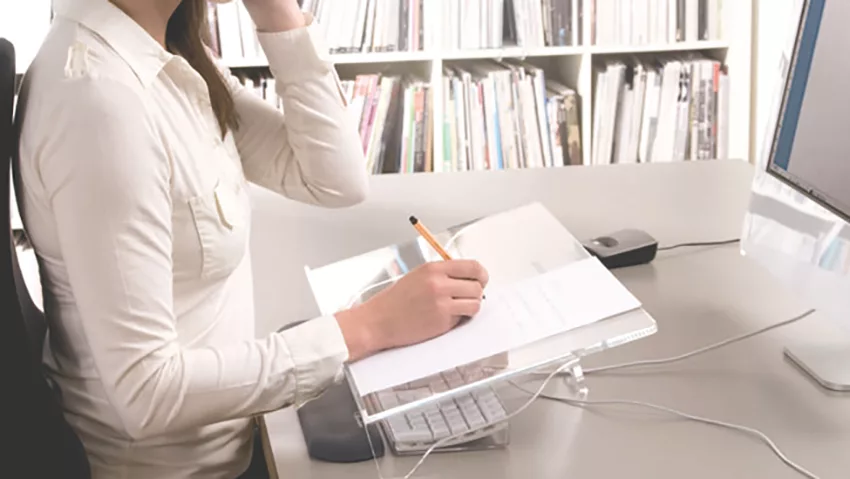
Aujourd’hui, la majorité des postes de travail au sein d’une entreprise sont équipés d’un ordinateur, son utilisation étant nécessaire voire indispensable, et ce dans quasiment l’ensemble des secteurs d’activités. Travailler devant un ordinateur de façon prolongée n’est toutefois pas sans risque pour la santé. En effet, un espace de travail comprenant un ordinateur doit bénéficier d’un équipement minimum permettant à la fois d’obtenir un meilleur agencement, mais également de prévenir l’apparition de certains TMS dus à une mauvaise posture adoptée au cours de la journée.
Ainsi, même avec un investissement limité, il est possible d’améliorer considérablement les conditions de travail de l’opérateur et ainsi réduire les risques d’apparition de douleurs et problèmes chroniques. Quelques accessoires tels que les support de documents, souris ergonomiques, bras support écran, ou encore repose PC portable permettent d’adopter une position neutre face à son écran, et ainsi éviter les TMS les plus courants tels que les douleurs au dos, cervicales, épaules, bras, poignets, etc. Cette Fiche Conseils traitera en particulier de l’utilisation et des bénéfices avec d’un support de documents sur un poste sédentaire, vous pouvez toutefois retrouver l’ensemble de nos fiches conseils dans notre rubrique Guides et Conseils.
Mauvaises habitudes et conséquences sur la santé
Selon différentes études[1] menées en milieu professionnel, la prévalence des troubles musculo-squelettiques a été estimée entre 10 et 62 % chez les personnes travaillant sur poste informatique. De plus, il a été établie que les TMS les plus fréquents provoqués dans ce cadre, touchent principalement les membres supérieurs[2] tels que la tête, le cou et le dos.[3] Si l’apparition de ces douleurs est principalement due à la mauvaise posture adoptée au cours de la journée, elle est accentuée lors de la consultation de documents et prise de notes. En effet, selon une étude réalisée par un laboratoire indépendant de biomécanique[4] et mis à disposition pour Azergo, les documents consultés sont généralement placés soit sur un coté du clavier, soit entre l’opérateur et son clavier, sollicitant ainsi fortement les cervicales, trapèzes et deltoïdes.
« La prévalence des troubles musculo-squelettiques a été estimée entre 10 et 62 % chez les personnes travaillant sur poste informatique. »
En plus d’encourager les sollicitations de ces zones, un mauvais placement des documents accentue le risque de fatigue visuelle. Le mouvement des yeux et la distance effectués par ceux-ci en passant d’un document placé sur le côté ou en dessous du clavier jusqu’à l’écran contraignent les yeux à faire rapidement la mise au point dans un laps de temps extrêmement court, et ce généralement de manière répétitive. Cette fatigue visuelle peut se traduire par des céphalées, une vision floue, des picotements et une rougeur des yeux, ou encore une fatigue mentale. L’équipement d’un support de documents, ainsi l’adoption de quelques bonnes habitudes permettent de limiter ces risques et de travailler de manière plus productive.
« En plus d’encourager les sollicitations des zones des cervicales, trapèzes et deltoïdes, un mauvais placement des documents accentue le risque de fatigue visuelle.»
Qu’est-ce qu’un support de documents, et pourquoi l’utiliser ?
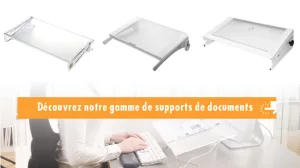
Le support de documents, ou pupitre, est un accessoire ergonomique qui s’installe sur un poste de travail équipé d’un ordinateur fixe et d’un écran. Il se place entre le clavier et l’écran, de manière à ce que les documents soient placés en face de l’utilisateur. Il existe deux types de supports de documents : les supports fixes et les supports avec plateau coulissant, dont le choix dépendra de l’utilisation finale :
- pour une consultation et lecture de documents, un support de documents fixe sera préconisé car celui-ci sera utilisé comme pupitre.
- Lorsque l’utilisateur est amené à faire régulièrement des annotations sur les documents consultés, il est alors conseillé de lui mettre à disposition un support de documents à plateau coulissant.
Quels sont les effets sur la posture ?
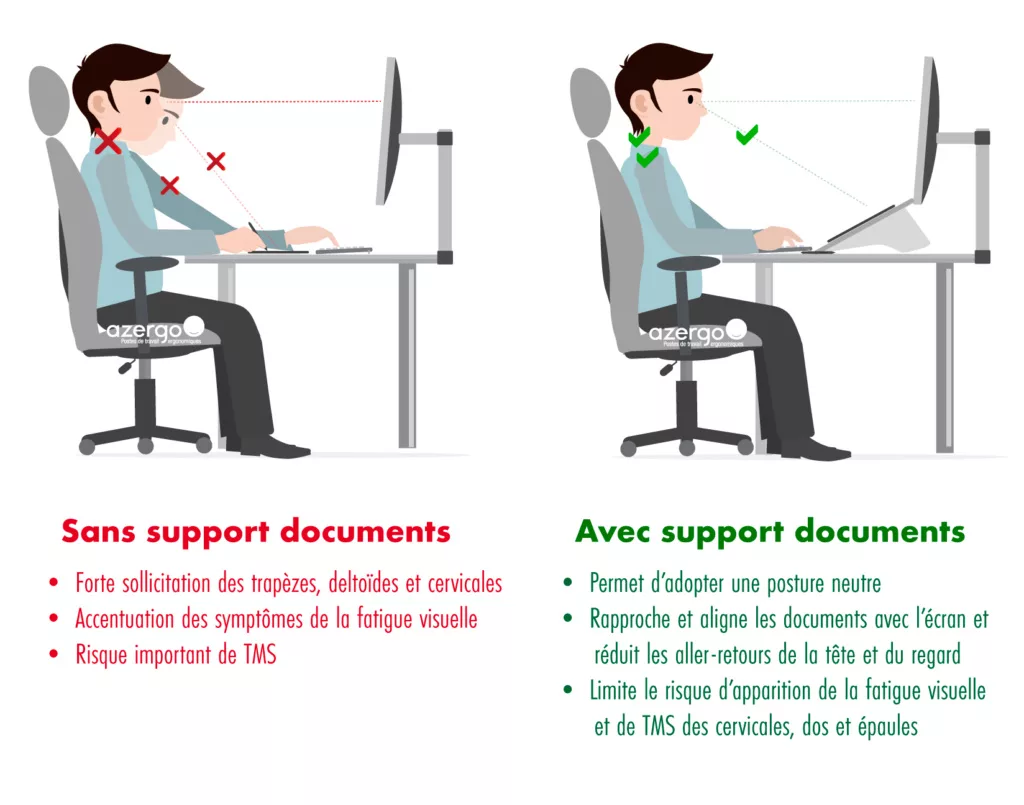
Sans support de documents, une consultation de documents répétée au cours de la journée accentue le risque de souffrir de douleurs cervicales et dorsales. L’usage veut que sans équipement spécifique, une personne travaillant sur poste informatique place ses documents entre elle et son clavier, la contraignant ainsi de tendre les bras, courber la nuque et faire des abaissements de tête répétitifs entre son document et l’écran. La deuxième situation la plus courante lors du travail sur documents est le cas où les-dits documents sont placés sur l’un des cotés du clavier, provoquant ainsi des torsions au niveau du dos et des cervicales.
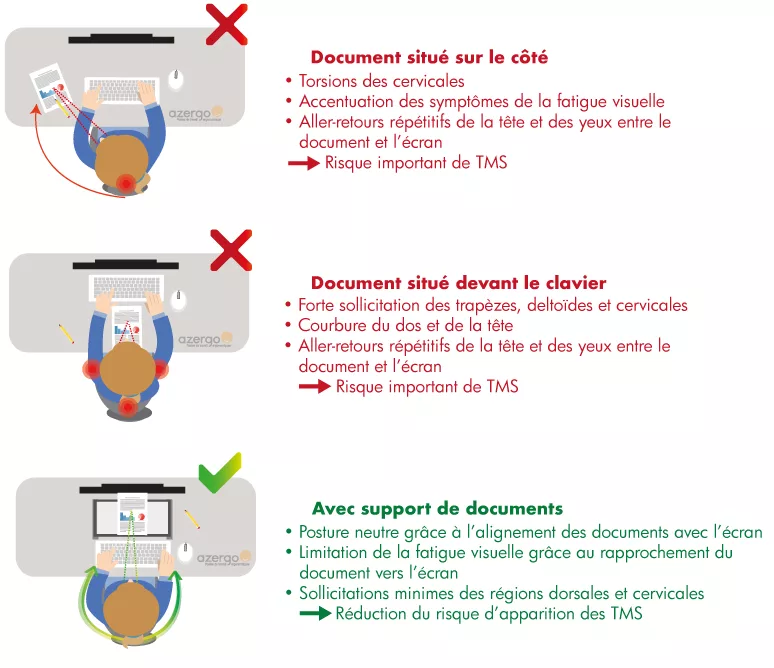
En plaçant un support de document entre son clavier et son écran, l’utilisateur va naturellement se redresser et adopter une posture neutre, réduisant ainsi les risques de TMS et de fatigue visuelle et donc gagner en confort et en productivité. En effet, les résultats de l’étude effectuée par le laboratoire indépendant de biomécanique [5] montrent que l’activité musculaire relevée au niveau des trapèzes diminue très significativement lors de l’utilisation du support de documents à plateau coulissant Multirite. De plus, cette étude révèle qu’en s’installant sur un siège de travail ergonomique réglé selon sa morphologie et les recommandations de l’INRS, l’utilisateur du support de documents voit l’activité de ses trapèzes (région dorsale et cervicale) diminuer de 64% en moyenne des deux côtés du corps, et l’activité musculaires des deltoïdes (région de l’épaule) réduire de 59 %.
Placé dans l’alignement du clavier et de l’écran, le support de documents permet ainsi de recentrer le regard et d’avoir un angle de vision plus court entre ces trois éléments, et ainsi d’éviter les tensions dans les muscles du cou et de limiter la fatigue visuelle.
« En s’installant sur un siège de travail ergonomique réglé selon sa morphologie et les recommandations de l’INRS, l’utilisateur du support de documents voit l’activité de ses trapèzes (région dorsale et cervicale) diminuer de 64% en moyenne des deux côtés du corps, et l’activité musculaires des deltoïdes (région de l’épaule) réduire de 59 %. »
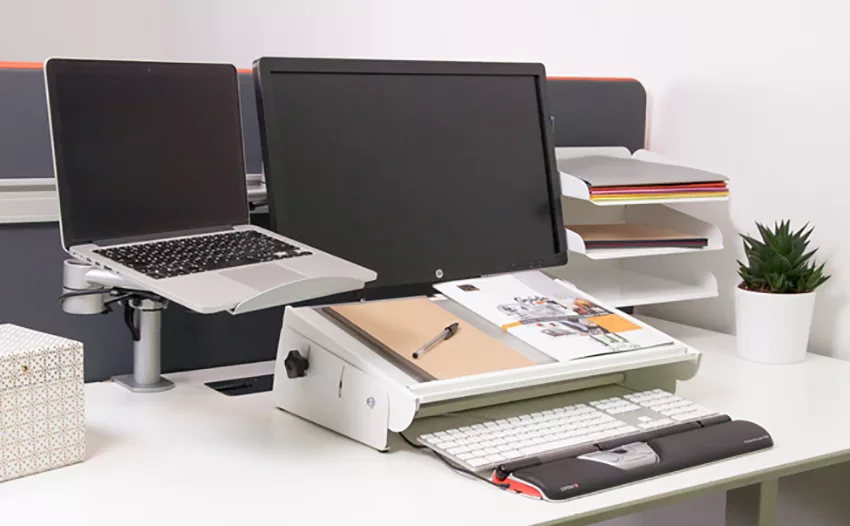
Exemple de poste de travail ergonomique comprenant un bras support écran et PC portable, support de documents, pointeur central et cloison acoustique
[1] ( Wahlström (2005) / Les troubles musculo squelettique (TMS) liés à l’utilisation de l’ordinateur au travail sont essentiellement liés aux membres supérieurs (Gerr et al, 2002)
[2] (Gerr et al, 2002),
[3] (Jensen et al, 2002).
[4] Etude à disposition sur demande – communication@azergo.fr
[5] Etude à disposition sur demande – communication@azergo.fr
Illustrations : ©Azergo 2016
Pour aller plus loin
Afin de prévenir l’apparition de TMS des membres supérieurs, ainsi que de limiter les symptômes de la fatigue visuelle, un poste de travail peut être équipé également d’un bras support écran, ainsi que d’une souris ergonomique. Le choix de ses accessoires dépend des problématiques liées à l’utilisateur ainsi qu’à son environnement travail, aussi, notre équipe peut vous aider à définir les solutions les plus adaptées à votre situation. Nous vous invitons également à consulter nos autres guides pour plus d’astuces et de conseils ergonomiques.
Crédits :
Photo : ©Azergo
Illustrations : ©Azergo 2019